What Does H1 Mean on an Espar EasyStart Pro Controller?
Posted by [email protected] on 30th Jun 2026
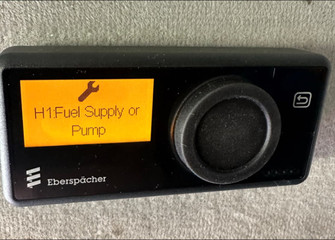
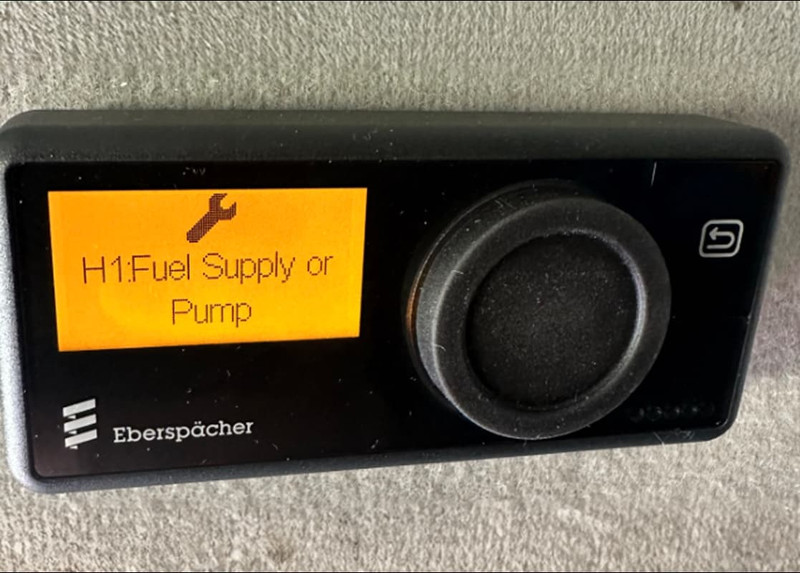
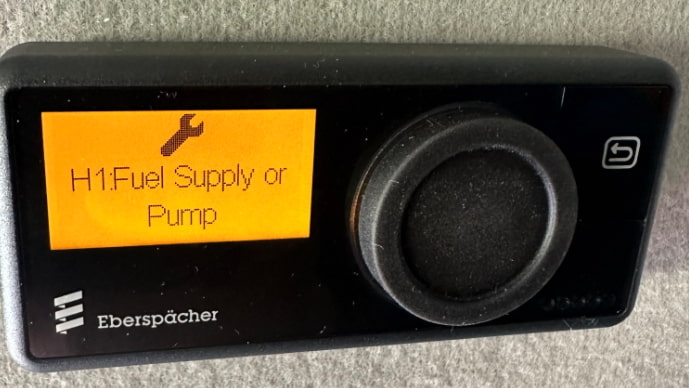
If your Espar / Eberspächer EasyStart Pro controller shows an H1 message, it can look more serious than it really is. We often hear from heater owners who see messages such as H1 Fuel Supply, H1 Ducting, or H1 Int. Temp. Sensor Faulty and assume the heater itself has failed.
In many cases, H1 is not the actual fault code.
The most important thing to know is this: H1 usually means the controller is pointing you toward Heater 1 and showing that fault information is available. The real diagnostic code is the P000 code stored in the controller’s fault memory.
Before replacing parts, resetting the controller, or ordering Espar parts, read the fault memory, write down every code, then clear the codes and run the heater again. The codes that come back after a fresh start attempt are the ones that matter most.
H1 is not the actual Espar fault code
On EasyStart Pro systems, H1 is best understood as an indication or heater label, not the full diagnostic answer. The EasyStart Pro can identify a heater as H1, meaning Heater 1. That is why an H1 message can appear before the actual fault code is reviewed.
The real fault code normally starts with P000.
For example, instead of troubleshooting only the wording on the screen, such as “H1 Fuel Supply,” you need to open the controller’s error memory and look for the stored P000 fault code. The last digits of that code help identify the actual fault condition.
That difference matters because the screen message may sound like a direct diagnosis, but it is often only a sign that stored heater faults need to be reviewed.
What H1 tells you about your Espar heater control setup
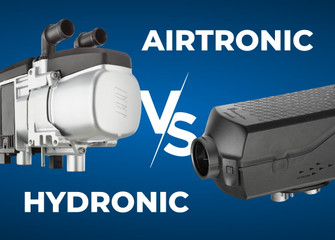
The EasyStart Pro is an Espar heater control option used with compatible Espar / Eberspacher air and hydronic heaters. When the controller displays H1, it is referring to Heater 1 in the controller setup.
That does not automatically mean the heater is defective. It means the controller is showing information for that heater position, and you need to check the stored Espar fault codes or Eberspacher fault codes in Error Memory.
This is especially important on systems where the controller has been installed recently, configured incorrectly, or connected in a setup with more than one compatible heater.
Why H1 messages can worry heater owners
Messages such as H1 Fuel Supply, H1 Ducting, or H1 Int. Temp. Sensor Faulty sound very specific. It is understandable for a heater owner to think the fuel pump has failed, the ducting is wrong, or the internal temperature sensor is damaged.
Sometimes the final fault may relate to one of those areas, but not necessarily.
A support technician needs the actual fault code before making that call. Without the P000 code, it is easy to chase the wrong part of the system. That can lead to unnecessary Espar parts orders, repeated resets, or confusion after a new installation.
The first step is always to read and document the stored codes.
The actual fault code starts with P000
When fault codes are available through the EasyStart Pro, the codes generally begin with P000. The exact code matters because different codes point to different diagnostic paths.
Some codes may relate to power supply, CAN communication, overheating, fuel delivery, ducting, air flow, coolant flow, or control unit communication. Others may be stored from earlier installation or commissioning attempts and may not return after being deleted.
That is why the best troubleshooting method is:
- Read the stored fault codes.
- Write them down.
- Clear the codes.
- Run the heater again.
- Check which codes return.
The codes that return after a fresh run attempt are much more useful than a long list of old stored codes.
Do not delete codes before writing them down
Before clearing the controller’s memory, document every code you see.
This is especially important if you plan to contact technical support. Once the codes are deleted, support may no longer be able to see what originally triggered the H1 message unless the same fault returns.
A simple note is enough:
- Date and time
- Heater model, if known
- Controller type: EasyStart Pro
- Exact screen message, such as H1 Fuel Supply
- Every P000 code shown in Error Memory
- Whether the code was current or stored, if shown
- What happened when you tried to start the heater
Taking a picture of the controller screen can also help, as long as the full code is visible.
How to check EasyStart Pro fault codes
The exact screen behavior can vary by controller version, but the general support process is:
- Wake up the EasyStart Pro controller.
- Go to the settings menu.
- Enter the workshop menu.
- Find Error Memory.
- Select the heater, usually H1.
- Select Read.
- Write down the codes shown.
- Delete the codes only after documenting them.
- Run the heater again.
- Recheck Error Memory and note which codes return.
If your setup is correct and there are no active heater faults, selecting H1 after clearing and rerunning may show no current errors. If a code returns, that code should guide the next troubleshooting step.
For a more detailed walkthrough, see our related guide: How to Read and Clear Espar Airtronic and Eberspacher Hydronic Fault Codes.
Why there may be a long list of codes after installation
A long fault list does not always mean the heater has multiple serious failures.
During installation, setup, first start attempts, fuel priming, wiring checks, or low-voltage events, the controller can store faults. If the fault memory was never checked and cleared after installation, the first diagnostic review may show a long list of old codes.
That is why clearing codes after writing them down is useful. It separates old stored information from faults that are still active.
After clearing, run the heater again under normal conditions. If only one or two codes return, those are the codes to focus on first.
If this happened after installation, review the installation checklist
If the H1 message appeared after a new installation or first startup, review the Eberspacher Air Heater Installation Checklist before assuming the heater is defective.
The checklist helps heater owners and installers confirm the basics that often affect startup, fault codes, and heater performance, including:
- Heater mounting
- Hot air ducting
- Combustion air routing
- Exhaust routing
- Fuel system setup
- Electrical connections
- Final startup checks
This is especially useful when the controller shows installation-related messages such as fuel supply, ducting, overheating, voltage, or communication-related faults. A restricted air duct, unstable power supply, incorrect fuse sequence, loose connector, unprimed fuel line, or exhaust issue can all create symptoms that look like a failed heater but actually trace back to the installation.
Use the checklist as a companion to the official Eberspächer installation manual, not as a replacement for it. For model-specific limits, wiring, fuel line lengths, exhaust routing, and safety requirements, always follow the manual for your exact heater.
What if the H1 message comes back?
If the H1 message comes back, open Error Memory again and read the P000 codes. Do not troubleshoot from the H1 wording alone.
For example:
- If a fuel-related code returns, the next checks may include fuel level, fuel line routing, fuel pump operation, priming, and restrictions.
- If a ducting or overheating-related code returns, the next checks may include air intake clearance, outlet restrictions, crushed ducting, blocked vents, or incorrect duct diameter.
- If a temperature sensor message returns, the next checks may depend on the exact fault code and controller configuration.
- If a CAN communication code returns, the wiring, controller connection, and control unit communication path may need to be checked.
Those checks should follow the relevant Espar / Eberspächer manual and the specific fault code table for your heater model.
When to contact technical support
Contact technical support if:
- H1 remains on the controller after clearing and rerunning the heater.
- No P000 fault codes are shown, but the H1 message does not disappear.
- The same code returns immediately after clearing.
- The heater locks out.
- You see wiring, power, fuse, combustion air, exhaust, fuel, coolant, or overheating-related faults.
- You are unsure whether the code is old or active.
- You need help identifying the correct Espar parts after confirming the fault code.
- The system has two heaters or a grouped EasyStart Pro setup.
For two-heater or grouped EasyStart Pro setups, contact support before changing configuration. The controller setup and CAN wiring need to match the intended heater layout, and incorrect setup can create confusing diagnostic messages.
Which Espar heaters can this apply to?
This article applies to compatible Espar / Eberspächer heaters that use the EasyStart Pro controller, especially second- and third-generation systems.
Common air heater models include:
- Airtronic S3 D2L
- Airtronic S3 B2L
- Airtronic M3 D4L
- Airtronic M3 D4R
- Airtronic M3 B4L
It may also apply to compatible Hydronic CS heaters, including:
- Hydronic D4E CS
- Hydronic D5E CS
- Hydronic B4E CS
- Hydronic B5E CS
Model names matter. Do not assume that a similar-looking Espar or Eberspacher heater uses the same controller, communication protocol, or diagnostic process. If you are not sure which heater you have, check the heater label and contact support with photos of the label, controller, and wiring.
Related Espar troubleshooting guides
If you are seeing an H1 message, these related guides can help you narrow down the next step after checking the P000 fault code.
How to Read and Clear Espar Airtronic and Eberspacher Hydronic Fault Codes
Start here if you are not sure how to open Error Memory, read stored codes, or tell support which codes appeared on your controller.
Espar P000 Fault Codes: What to Check First
Use this guide after you have written down the P000 code. It can help you understand the first checks before assuming a component has failed.
Quick takeaway
If your EasyStart Pro shows H1, do not panic and do not start replacing parts.
H1 is usually a sign that the controller has heater fault information available. The actual diagnostic clue is the P000 fault code stored in Error Memory. Write the code down, delete it only after documenting it, run the heater again, and then focus on the codes that return.
That process gives support the information needed to help you quickly, prevents old installation codes from sending you in the wrong direction, and helps you avoid ordering Espar parts before the actual fault is confirmed.
FAQ
Is H1 an Espar fault code?
No. In this support context, H1 is not the actual fault code. It indicates that fault information is available for Heater 1. The actual diagnostic code usually starts with P000.
What does H1 Fuel Supply mean?
It means the controller is showing a fuel-supply-related H1 message, but you still need to read the P000 code in Error Memory before diagnosing the fuel system.
What does H1 Ducting mean?
It means the controller is showing a ducting-related H1 message. Check the actual P000 code first, then review the heater manual and installation checklist for air intake, outlet, and ducting restrictions.
What does H1 Int. Temp. Sensor Faulty mean?
It means fault information is available. Do not assume the internal temperature sensor has failed until the actual P000 code has been checked and confirmed.
Should I delete EasyStart Pro fault codes?
Only after writing them down. Document all codes first, then delete them and run the heater again to see which codes return.
Why do I see many fault codes after a new installation?
Some codes can be stored during installation, setup, priming, wiring checks, or early start attempts. If the memory was never cleared, the list can look worse than the current issue really is.
What should I check if H1 appeared right after installation?
Start by reading and writing down the P000 codes. Then review the Eberspacher Air Heater Installation Checklist, especially fuel system, ducting, exhaust, combustion air, electrical connections, fuse sequence, and final startup checks.